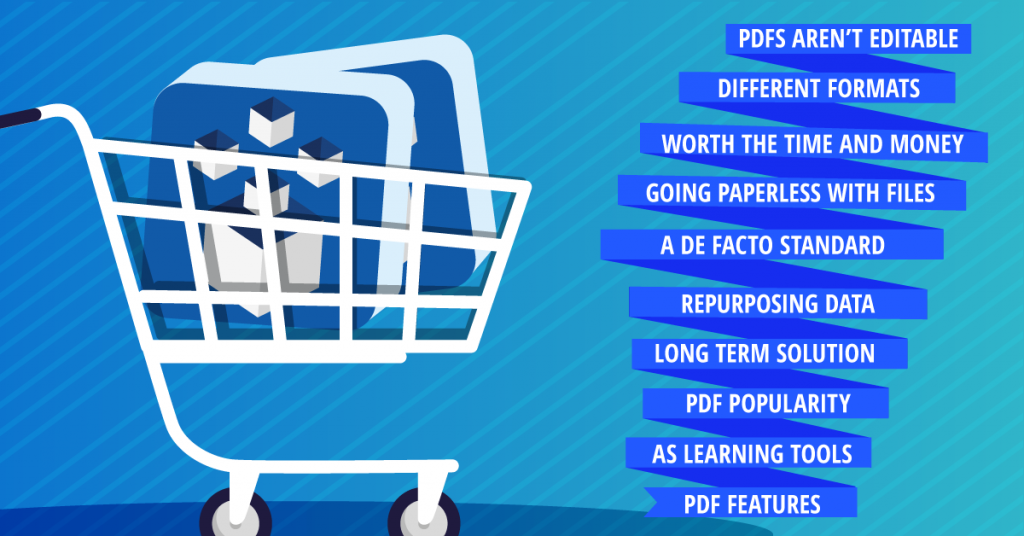
Top 10 Reasons To Buy A PDF Converter

Top reasons to buy a desktop PDF converter software

When you’re considering whether to buy a PDF converter program or not, making the right choice is difficult, especially if you’re sitting on the fence about why you should purchase a conversion product or not to begin with.

You may think that since you’re not a heavy PDF user you don’t really need one, or that you’ll pay a bundle for one then rarely use the program, or that you can get along fine without one since there are other methods that can save you the money.

Well, if you need a little encouragement to justify the purchase of a PDF converter (and do away with the lingering doubt), here it is—ten reasons for you to buy a PDF converter (in no specific order):

1) PDFs Aren’t Editable

PDF converters are primarily used for making PDF content accessible. Major editing or analysis is what most PDF content requires if the format is used for transmission. PDF converters can save you all the retyping and data input. You can extract PDF content into other editable formats where you can perform the needed analysis easily.

2) Access, Generate And Work In Different Formats

Freeing up the locked down PDF content leads into another benefit that PDF converters provide: choice of format. There are many diverse formats to which the PDF format can now be converted. Word, Excel, PowerPoint, RTF and HTML are just a short list of the common ones which you can generate. It’s ultimately up to you and your work.

3) Going Paperless With Your Files

PDF converters are a simple solution for creating a personal e-filing system. With a PDF converter, you can manage PDF files and document information more effectively. A PDF converter is a good way to keep down the paper consumption and keep your edited work in digital files with the least amount of hassle.

4) The PDF Is A De Facto Standard

What does that mean? By common and popular usage, the PDF is the format professionals turn to when data needs to be kept in tact while being transmitted for review. The PDF is being used across industries, and converting PDF content is inevitably part of that usage. Having a PDF converter will allow you to integrate into such workflows effortlessly.

5) PDF Popularity

Take into consideration that PDFs are now created not just by professionals, but by ordinary end users for ordinary purposes. PDFs are being used on personal webpages for posting documents and miscellaneous content that are impractical as HTML pages. And at one point, you might need to convert those documents in order to use them.

6) Repurposing That PDF Data Completely

Opening PDFs in Adobe Acrobat Professional, you can perform minor editing. However, doing that won’t give you the ability to completely repurpose the content; PDF converters will. You can eliminate those makeshift extractions that constantly leave you frustrated in the end.

7) PDF Converters As A Long Term Solution

Admittedly, free online converters are great for quick, one time conversions. Free trials are also great for trying out products. Yet, neither are great for long term solutions. These converters are oftentimes limited, or will restrict your PDF conversions to being done online. With a proper PDF converter, you’ll have unlimited access and the ability to work offline whenever you choose.

8 ) An Investment That’s Worth The Time And Money

Time matters. The money you spend matters. Yet, if you don’t have a PDF converter, you’ll find yourself spending a lot of both looking for other alternatives, alternatives that are perhaps not the best choice. Buying a good PDF converter is a worthwhile investment. Even if you occasionally use PDFs for research or collaboration, it makes working with those PDFs a lot easier.

9) PDF Converters As Learning Tools

It’s general knowledge that you can benefit from everything you do. Expand on what you know about the PDF by learning how to convert one. You’ll learn more about the ins and outs of the PDF than you normally would without a proper PDF converter.

10) PDF Converter Features

PDF conversion features in most applications go beyond the basic one-time quick conversion, and even increase the quality of your conversions. Batch conversions, OCR technology, page extractions, conversion settings—customize your PDF extractions with versatile features and get more out of the conversions you need.

So if you’re now convinced and ready to buy a PDF converter, start looking!

The ABCs Of The PDF: J-L

First off, my apologies. It has been awhile since the last posting in this series, and there is still yet more to uncover and discover. So for this posting, its about the figures behind the PDF world and information behind PDF links and some tips. If you’re stalking up on some backgrounder bits and PDF facts in preparation for the 2007 Conference, then by all means, read on.

John E. Warnock

The name, the man, the father behind the PDF, Dr. John E. Warnock. Along with Charles Geschke, he co-founded Adobe Systems, Inc. in 1982. Before that, he worked as a computer scientist at Xerox Palo Alto Research Center (PARC) in 1978, where he first developed the Post Script language (aka “Interpress” in its early Camelot development), the page description language which would be the building blocks of the PDF.

For the first two years of the company, Warnock served as president of Adobe Systems Inc. and then was CEO until his retirement from that position in 2000. Warnock has led an active career of achievements in computer technology, being highly distinguished in numerous associations and winner of countless awards for his innovation and influence. He is now co-chairman of Adobe with Charles Geshcke.

Also interesting to note is that he has an Adobe typeface named after him—Warnock Pro. Here is a quoted description: “Warnock Pro’s structure is both rational and dynamic, striking a balance between innovation and restraint.” I wonder if the look of the typeface design reflects his personality. . . .

Kurt Foss

As regular day-to-day PDF user, you hardly notice how quickly names can stick in your head—Kurt Foss being one of them. I first came upon Kurt Foss in the beginning of my PDF research, when I read many blogs and searched many articles (I still do). And his were among the top of the research piles.

And doing a bit of research on Foss himself, you’ll find that he has a major presence in the PDF world too. As a long time veteran of the PDF industry, his attraction to the PDF world was a passion for the format, a curiosity about the potential uses and users of the format: “I became increasingly aware of looming technological changes that seemed poised to change the way my profession worked. So I immersed myself in learning about it.” One of his most “notable notables,” in fact, was being one of the first to globally publish newspaper pages in the PDF format, experimenting with how the digital format could work for the printed word.

Foss started out as an Adobe evangelist with the company from 1993-2003 when Acrobat was still in its first version. Since then, he has been web editor of both PDFZone and Planet PDF, and has written articles on issues surrounding the uses of the PDF format. Currently, Foss is the online editor of the Acrobat User Community, a site you may have heard of or been to at one point or another for resources and tips. He has written numerous posts, commenting, reviewing and reporting anything and everything having to do with PDF.

Links

Linking within a PDF file itself is a great way in which to include more background content within your file. Yet, the hypertext link, itself, has a background history of its own, one associated with Vannevar Bush’s influential work ,“As We May Think.”

The paper contained the first rough concept of the computer, called the Memex, an idea which inspired the creation of the actual hypertext as we know it today. The term “hypertext” was first coined by Ted Nelson in 1965, and its invention is usually accredited to him and American scientist, Douglas Engelbart. In 1968, with Engelbart’s historic “Mother of All Demos,” the first hypertext interface was demoed. And by 1980, Tim Berners-Lee, also another famous name, created a hypertext database system, a system created out of a motivation that became the same driving force behind the World Wide Web and the Internet—to meet the demand of automatic information sharing. The implementation of such hypertext link databases in the late 80’s eventually led to the first stages of the World Wide Web.

Of course, needless to say, when you add links within your PDF, you create the same mini-network of information resources and sites. However, behind the convenience of endless information resources, is the frustration of usability. Web usability guru, Jakob Nielsen , has a few words on the use of links and the PDF, which might come in handy in making that PDF user-friendly and informative.

Hope this helps out with that small talk. ‘Till next time!

Investintech.com Releases New Product Versions

Good news everyone!

We’ve just released the newest version of our flagship product, Able2Extract, this week. It’s now at version 4.0, which means more advanced conversions for extracting PDF graphics into different formats.

And in addition to that update, we’ve also improved our Able2Doc products as well, with better PDF to Word conversion output and an updated interface.

Of course, if you have previous versions of our software, we’ve got upgrades posted up for you so you don’t miss out on the latest features.

And so, in honour of taking one gigantic step forward with the new release, I thought it would be a good time to take a small step back. Releasing a new product version is always a perfect time to reminisce about the “good ol’ days”—thinking about where you’ve been and what you’ve done. And, in 6 years, after hard work (read: blood, sweat and tears) we’ve come a long way!

A Brief Trip Down Memory Lane

We also have our own history of fun facts to know and tell that date back to our foundation in 2000. In the early days, when trying to build the name and the product line, Investintech worked out of the company president’s apartment for a time (that’s right, “home base” was actually “home”). The staff was numbered at only 3 at the time: the president, executive vice president and lead developer, which meant honing down those much needed multi-tasking abilities until workloads demanded a staff. It consists of 9 members today.

The name “Investintech.com,”  itself, was coined because the site was initially supposed to be a financial information website focused on small cap technology companies. In the end, we found a nice niche in the PDF world, expanding one idea into another and eventually into one that combined specific working needs and practical software demands.

Our first product, Able2Extract 1.0, in fact, began as a simple PDF to Excel converter, which worked well, but not well enough to be put out on the market. After innovation, expansion and development, the products branched out into ones with more advanced capabilities—Able2Doc, Sonic, OCR technology, better GUIs, SDKs, server side software, conversions to HTML, PowerPoint, Word, and (better conversions to) Excel. Thus, this new version adds another big milestone to the list with a foothold in the graphic conversion arena.

Now, in a nice and cozy (and just as home-y) office here in downtown Toronto, Investintech has grown into the company you see on the screen before you.

There’ve been many challenges and successes along the way, and these new product versions are only one of them. And undoubtedly, there’ll be more to come.

Cheers!