PDF to HTML Conversion
Everyone knows that in order for information to be of any use to the general public, it must be capable of being rendered by any possible platform and operating system out there. As a consequence, universal formats such as HTML and PDF have become general household names in the world of data exchange.
No doubt, you’ve experienced the need to convert between the two formats in cases where some users don’t have a PDF reader or if you need to keep the integrity of the HTML web page for others to view. Notably, with the growing widespread use of the World Wide Web, website construction using HTML has boomed into a major industry. Everyone from the professional designer to the most amateur are creating HTML pages.
Web Designing, HTML and You
A good website is a good balance between textual and visual data. The first impression on the 3 second attention span of a Web surfer is important. Hence, most likely, you’ll spend most of your time on the content of your site.
In order to achieve a visually appealing site, you’ll probably try to cram all kinds of professional graphics and images on your page, which translates into hours of fine-tuning with image file formats such as JPEGs, GIFs, PNGs, etc. Too much time and too much work.
Another thing to remember is that the content of a website depends upon its purpose. Hence, the amount and nature of your data can vary. For some, using external links and supplementary formats is the most common way to populate a website. However, it means you’ll also have to consider the amount of linkage and levels you want your site to contain–that means more planning and organizing.
Let’s not forget that web pages work with an underlying programming language, most commonly HTML. You’ll need to use HTML for embedding the content onto your web page. That can take hours of tedious encoding and configuration. Does the amount of work ever cease?
HTML and the PDF
A simple way to be efficient? Incorporate content you already have by converting it directly into HTML. This is where another data exchange format can come in handy: the PDF.
PDF to HTML conversion will allow for easier web content construction. In addition, PDFs retain the graphic integrity of the image, being capable of rendering vector and bitmap images. So you don’t have to worry about losing image quality.
By being able to recreate the PDF in HTML, the PDF will be shown right on the website without having to click on an attachment, saving you the time of organizing and rearranging your site.
It may sound unorthodox, but if you have an information container that can contain and retain the integrity of both the textual and graphical information you need, why not use it for that purpose? Certain processes for constructing a website can’t be totally done away with altogether, like the HTML coding aspect. It can only be facilitated.
Converting PDF to HTML
Converting PDF to HTML is nothing new. There are many conversion software applications out there that provide the functionality – our Able2extract Professional included.
Able2Extract Professional gives users full control over PDF to HTML conversion process. For instance, you can even convert a PDF file made from PowerPoint to HTML and still have the original colours and designs.
Whatever type of information your PDF contains, you can incorporate it into your website by converting PDF to HTML using Able2Extract Professional. Here’s how:
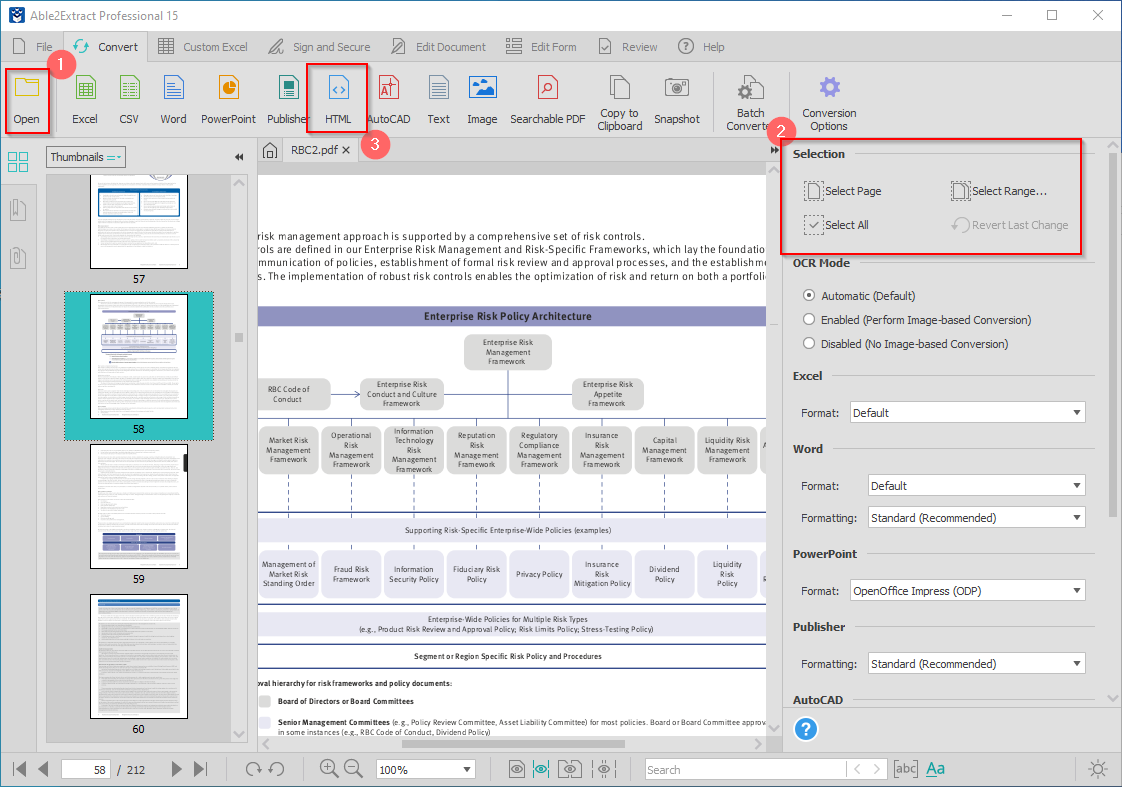
- Open the PDF file in Able2Extract Professional
- Click on the HTML icon to convert the entire PDF to HTML.
Optionally, you can drag-select only a part of the document for conversion or use the selection options in the right-side panel.
The end result is pure HTML content with both text and images that perfectly fit the screen.
Start turning your PDFs to HTML quickly without delay. Get started FREE!