Able2Extract Professional 21
The Best-in-Class PDF Converter
Secure Offline PDF Tools: Convert, Edit, OCR, Fill Forms & More
Convert to Excel
Custom PDF to Excel
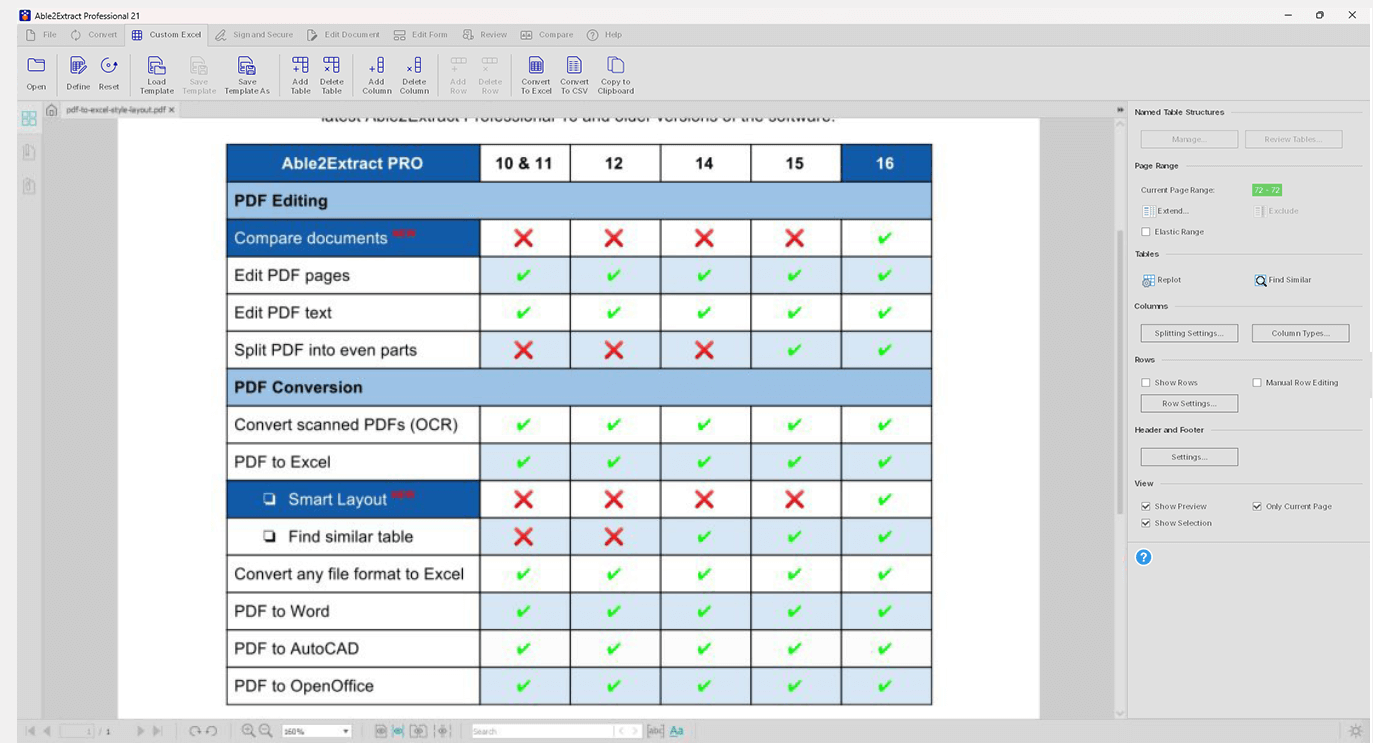
Custom PDF to Excel conversion allows you to manually designate the column and row structure of your data. The custom PDF to Excel conversion panel gives you easy access to visually tailoring your Excel conversion.

Conversion Output Preview
Preview your PDF to Excel conversion results and get your business data just the way you need it. Use the PDF Preview Panel to view and adjust your conversion output before you convert your PDF data to Excel.
Keep original layout & style
Our advanced layout recognition engine continually inspects various properties to ensure accurate transfer from PDF to Excel even for the most complex tables. Merged & multi-line cells, fonts, numerical formats, background colors, and borders remain consistent after conversion.
PDF to CSV
Export PDF to CSV (Comma Separated Values) and TSV (Tab Separated Values) formats. Specify the column and row structure within the table using Able2Extract’s Custom PDF to CSV option.
Convert Any Format to Excel
Easily transfer table structures from a wide range of formats directly into Microsoft Excel. Quickly export tabular data from MS Word, PowerPoint, XPS and more into Excel spreadsheets.

Set up conversion templates
Save your custom PDF to Excel conversion as a template and eliminate the time spent on resetting the same conversion parameters for similarly formatted PDFs. Perfect for monthly invoices and transaction records in PDF.

Handle inconsistent table structures
Create Named Table Structures to gain more control over PDF table data extraction. Deal more efficiently with inconsistent table structures and get accurate conversion results despite variations in PDF tables.
Smart Templates
Automate PDF to Excel conversions even further using AI-powered smart templates. Train Able2Extract Professional to precisely locate and convert relevant tables from your PDF statements and reports. Quickly extract data from matching table structures regardless of the table size and position in the PDF document.
Master Templates (Batch)
Utilize the speed of Batch conversion and the efficiency of Custom Excel Templates. Separate PDF documents into different categories and process each PDF with category-specific templates. Able2Extract Professional will automatically determine the document category, load the matching template and batch convert PDFs to Excel or CSV.

Find Similar
Search for a specific table structure that occurs throughout a PDF document during a Custom Excel conversion. You can find, select and convert only the specific tables structures you need and nothing more. Convert PDF tables to Excel with more precision and speed than ever.
Convert PDF

Accurate Pinpoint Conversion
Customize your conversion by selecting the desired page range, a specific page, a single paragraph, or even one line of text for conversion.

Windows Extension
Quickly convert your PDF files to any of the supported formats directly from your Windows desktop using the new extension option, without having to open and upload files to Able2Extract Professional.
PDF to Word
Experience enhanced PDF to Word conversion with deep structural analysis for superior accuracy. Generate DOCX files with clean paragraphs, precise columns, and accurately preserved tables - no manual layout reconstruction required.
PDF to Excel
Choose between the automatic and custom PDF to Excel conversion to convert complex PDF table data to Microsoft Excel with pinpoint precision and forget about cleaning up poorly formatted output results ever again.
PDF to PowerPoint
Transfer visual content and business PDF presentations into editable PowerPoint slides. Edit and polish off your keynote content in Microsoft PowerPoint.
PDF to AutoCAD
Recover CAD drawings by converting PDF to DWG and DXF, while retaining vector graphics and text. You can freely work with the conversion output in other CAD applications.
PDF to Images
Convert PDF to JPG, BMP, PNG, TIFF, GIF, and WebP images. Apply image specific settings for your conversion such as DPI, image resolution, GIF animation speed, JPEG quality, and more.
Extract All Images
Instantly extract all images within your PDF file as individual image files without any quality loss. All images are stored in a designated folder and ready for use in other programs.
PDF to HTML
Convert your PDF content into HTML you can easily upload and share online with others. Single and batch output support with replicated formatting and layout.
PDF to Publisher
Convert PDF to Publisher to reclaim, edit and interact with PDF content right within Microsoft Publisher. Improve upon content intended for professional print.
PDF to Open Source Formats
Convert PDF to formats native to OpenOffice and LibreOffice: Writer (ODT), Calc (ODS), and Impress (ODP).
Turn Popular File Formats to PDF
Create professional-quality PDFs from MS Word, Excel, PowerPoint, images, and other commonly used file types.

Create a Blank PDF Document
Design your PDF documents and forms from scratch. Create a blank PDF and add as many blank pages as you’d like.
PDF OCR

Convert Image-based PDF
Accurately extract image-only PDFs into fully editable and searchable content with the help of advanced OCR technology. Convert scanned PDFs into Word, Excel, PowerPoint, AutoCAD and more.

Convert Poor Quality Scans
Use Able2Extract’s OCR engine to convert even the poorest document scans. Correct skewed content and iron out grainy, broken text into smooth fonts and lettering.
Extract Scanned PDF Tables into Excel
Stop retyping scanned tabular and numerical data into Excel. Extract all your image-based PDF tables into perfectly formatted Excel spreadsheets for immediate analysis and manipulation.

Multi-language Support
Get high quality results when extracting scanned PDF text in 8 new languages. Use our upgraded OCR engine to accurately recognize Italian, Portuguese, Dutch, Greek, Danish, Norwegian, Finnish and Swedish in addition to English, Spanish, French, and German.
Edit PDF

PDF Text Editing
Add new or delete existing PDF text directly within the viewing window itself. Modify lines and blocks of text seamlessly by customizing the text’s font, colour and size.
Add Images and Vectors
Insert JPG, BMP, PNG, GIF and TIFF images and various vector shapes onto the PDF page to create richer, more personalized PDF content. Insert corporate logo and other branding elements.

Insert Bates Numbering
Instantly add Bates numbering to PDF pages and index your business, medical and legal documents hassle-free. Select from a wide range of formatting options--numbering sequences, prefixes and suffixes, date-time stamps, and more.
Insert Blank PDF Pages
Insert blank pages into PDF and start creating PDF content from scratch. Customize new pages with text, images, vector shapes, form fields and more.
Merge and Split PDF
Split and merge PDFs instantly. Insert pages from other PDFs or extract pages into brand new PDF files. Assemble and tailor your business PDFs directly in Able2Extract Professional.

Resize and Scale PDF pages
Specify paper sizing options for content intended for different types of businesses. Scale PDF pages along with the content and annotations.

PDF file editing
Perform essential PDF editing tasks. Make document management easier by modifying your file’s metadata or change the viewing preferences of your PDF to suit your readers’ needs.
Repair PDFNew
Automatically or manually repair corrupt or damaged PDF files, restoring their structure, internal data, and formatting, so the documents become viewable and usable again.
Compress PDFNew
Reduce the file size of native and scanned PDFs using custom compression options. Compress bitmaps, subset fonts, and remove annotations and attachments from your documents.
Batch PDF Tools

Batch PDF Conversion
Automate the conversion process by queuing up a large volume of PDF files and even whole directories. Batch convert PDF to a wide range of formats from MS Office to AutoCAD and HTML.

Batch Convert with OCR
Use the powerful Batch OCR conversion functionality to upload and easily convert multiple scanned, image-based PDs to Word, Excel, and other supported file formats.

Batch PDF Creator
Create PDFs from multiple files in one go. Save hours with the Batch Creator’s ability to batch merge PDF files during the PDF creation process.

Batch Merge Documents
Convert whole folders of PDFs to a single output file (Word, Excel, AutoCAD, HTML and more) and instantly merge batch created PDFs. Take your PDF productivity to the next level with powerful 2-in-1 tools.
PDF Forms

Fill in PDF Forms
Fill in interactive PDF forms directly by clicking onto the fields and entering and editing your information. Specify options through radio buttons and checkboxes, select items from combo boxes and list boxes and submit them with a push of a button.

Create and Edit PDF Forms
Turn non-interactive PDF forms into fillable ones, repurpose them, or create PDF forms from scratch. Add text fields, checkboxes and radio buttons, insert push buttons, resize fields, change the font color & more.
Export Form Data to CSV
Easily collect and manage valuable data by extracting your important PDF form data into a formatted CSV file that is ready for further editing and analysis.
PDF Forms to ExcelNew
Export form data from fillable PDFs alongside native page content into Excel. The form field data is seamlessly integrated with the original content, resulting in a clean and organized output.
Compare Files
Compare Any 2 Printable Documents
Compare any two printable documents to reveal discrepancies between them. Able2Extract Professional will help you quickly examine all differences in a handy side-by-side view.
- Compare documents content regardless of the file format.
- Analyze substantial changes such as added, edited, or deleted text and images.
- Highlight similarities or elements that are unique to one of the docs.
- Mark up discrepancies with annotation tools or copy them to clipboard.
- Save comparison results as an annotated PDF file.
View PDF
PDF Viewer
Open and read any PDF in Able2Extract Professional’s complimentary PDF viewer.
- Simultaneously open and view two or more PDFs.
- Easily navigate and search through your PDF document.
- View two pages at a time, zoom in and out or rotate PDF pages if needed.
- Fill in and submit interactive PDF forms.
- View PDFs even if you don’t have a license for using its advanced features.
- Dark theme support for working in low-light conditions.
- Hand tool provides easier document navigation.
- Use mouse cursor position as the pivot point for view zoom operations.
- Select specific words or phrases and search them online in a couple of clicks.
Review PDF
PDF Annotations
Annotate PDF content and collaborate with others like never before. Able2Extract Professional offers a full range of markup options you can directly insert on the PDF page.
- Insert comments, sticky notes, and stamps.
- Highlight, underline or strikethrough specific content.
- Attach various files.
- Add a squiggly (jagged) underline and caret.
- Fine tune your document by adjusting color, opacity and other relevant properties.
PDF Security and Signatures

Add Signatures to PDFs
Insert electronic and valid digital signatures to your PDF documents from your desktop. Use Able2Extract Professional to sign PDFs with signature images and digital (cryptographic) certificates and add an extra layer of security to your confidential documents.

Validate PDF Signatures
Verify the authenticity of digital (cryptographic) signatures in PDF documents by inspecting the signature validation status. Identify the signer’s identity and make sure that the PDFs were not modified in any way after the digital signature was added.

Advanced PDF Encryption and Decryption
Secure your confidential PDF documents with 256-bit password protection. Encrypt and decrypt existing PDF documents with ease. Set up owner and user passwords to control how others use and interact with your PDF documents.

Advanced Permission Levels
Apply advanced file permission options and retain full control over who can print, copy, or modify your sensitive PDF documents even when you’re not around.

PDF Redaction
Permanently remove sensitive information such as social security or financial information from your PDFs.

Watermark PDF
Use Able2Extract Professional to add watermarks to your PDF pages to brand and safeguard your intellectual property. Make sure no one else can claim your own work and steal it from you.
PDF Conversion Made Simple
With our advanced AI-powered PDF to Excel conversion technology, Able2Extract Professional delivers results that perfectly match your original PDF. Spend less time copying and pasting, and more time analyzing and updating your data in Excel.
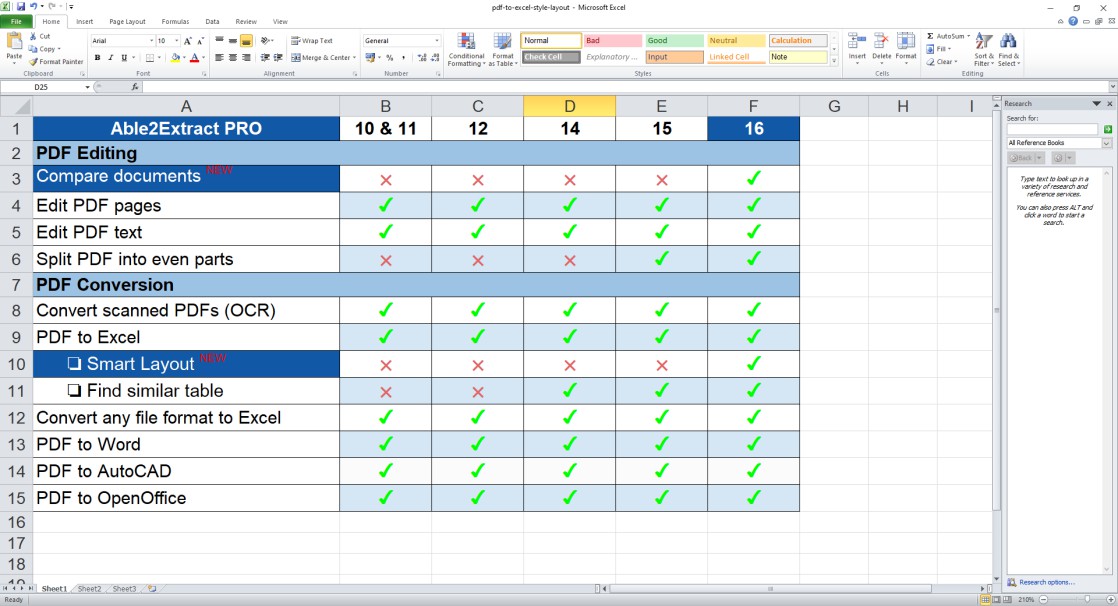
Slide to see the conversion output
The Best PDF Converter Alternative to Adobe® Acrobat®
Able2Extract Professional and Adobe® Acrobat® Pro DC are both powerful PDF solutions that let you convert, edit, sign, create, compress, and repair PDFs.
However, Able2Extract Pro delivers exceptional value. With a one-time payment of $199.95, you avoid Adobe’s $240 yearly subscription, saving $280 in just two years, and even more over time.
Enjoy lifetime access with no recurring fees, full compatibility on Windows, macOS, and Linux, and secure offline functionality. Contact us for volume discounts or explore the full comparison below.
Users Love Able2Extract PRO for a Reason

- Gartner Digital Markets reviews are shared across its different brands sites and constitute the subjective opinions of individual end-users based on their own experiences and do not represent the views of Gartner or its affiliates.
This tool is heaven-sent
This is by far the best PDF to Excel conversion tool I have ever used. And I used many of them. I got my full return on investment on day one, from the time this tool saves.
Business Valuator

Awesome PDF Converter and Editor
Able2Extract Professional is a robust and user-friendly solution for extracting data from PDF files that also provides PDF creation and editing functions with fair pricing.
Accountant

Best PDF to Excel conversion
The OCR and conversion of PDF to Excel or Word is great, and having a piece of stand-alone software is far superior to an online subscription.
Senior Accountant
Able2Extract Pro FAQ
Able2Extract Professional is a comprehensive PDF converter designed for users needing reliable, high-quality PDF conversion to Excel, Word, PowerPoint, AutoCAD, HTML, and more.
It includes advanced features such as custom conversion to Excel, OCR for scanned files, batch processing, and tools for editing PDFs, creating and filling forms, compressing files, and repairing damaged PDFs.
Able2Extract Professional is available on Windows, macOS, and Linux, with a 7-day free trial and a perpetual license option for both single users and large enterprises.
The latest version of Able2Extract Professional is Version 21.
Click here to see all the new features added in Version 21 or upgrade your license if you're an existing user.
Able2Extract Pro is priced at $49.95 for a 30-day license and $199.95 for a lifetime license.
You can purchase your license here or contact our sales team to inquire about volume discounts for multiple licenses.
No, there is no free version of Able2Extract Professional. However, you can download a 7-day free trial to evaluate the PDF converter and its features before making a purchase decision.
Once the trial expires, you will lose access to Able2Extract Professional unless you purchase a license.
No, Able2Extract Pro does not have a web-app version. It is a fully offline desktop application available as a downloadable program for Windows, macOS, and Linux.
However, you can try our online PDF tools for free:
Our online tools use the same conversion technology as Able2Extract Pro but note there is a limit of one file conversion per day to ensure our servers can manage the volume of requests. Your uploaded files are deleted one hour after conversion.
For unlimited conversions, you can purchase an Able2Extract Pro license.
You can easily convert a PDF to Excel in Able2Extract Professional by following these simple steps:
- Download Able2Extract Professional for Windows, macOS or Linux.
- Open your PDF using the “Open” option from the toolbar.
- Click on "Excel" under the "Convert" menu on the toolbar.
- Choose between "Automatic" and "Custom" conversion options.
- Automatic: Able2Extract will automatically convert the file to XLSX using default settings, providing accurate results for most PDF files.
- Custom: You can manually define the table structure and preview the output before conversion, ensuring higher accuracy and minimizing the need for post-conversion data cleanup.
- Specify the destination file and click "Save."
Note that Able2Extract Professional is much more than a basic PDF to Excel converter. It offers advanced custom conversion capabilities, AI-powered conversion templates, high-fidelity OCR, and efficient batch processing, making it the ideal choice for professionals who need precise data extraction and analysis.
Simplify Your PDF Conversions with Able2Extract Professional!
We Are Here for You!
Customer Support
Call us, email us, find us on social networks. As a licensed user, you are part of the huge Investintech family, and we'll make sure Able2Extract Professional is working to your standards. Contact us!
Request a Feature
We are committed to developing the product YOU need to tackle all PDF challenges. If there is a feature or improvement you’d like to see in Able2Extract Professional, by all means tell us about it!
Refund policy
We offer a full refund for any fully licensed product purchased from our online store within 14 days. Read our Product Return Policy.
User Resources