



Able2Extract Professional 21 delivers smarter PDF conversions with improved Excel accuracy, cleaner Word formatting, and a refreshed interface. This new version is built for speed, precision, and a better user experience.
Able2Extract Professional 21 is here! And it’s more refined, accurate, and user-focused than ever.
This latest release brings enhanced Word conversion for better editing, greater precision in Excel conversions, and a new refreshed look.
Able2Extract Professional 21 is built to help you handle complex PDF tasks with greater accuracy and speed.
For managing contracts, financial reports, or client deliverables, the upgraded features are designed to focus on precision, usability, and a better user experience overall.
Get a look at the newest capabilities and improvements up close and personal!
What’s new in Able2Extract Professional 21?
Able2Extract Professional 21 takes our PDF conversions to Excel and Word to the next level with smarter detection and analysis. Combined with a refreshed UI, these updates make your converted PDF data easier to work with.
Smarter PDF to Excel conversion accuracy
The first updates on our list are aimed squarely at PDF to Excel. These latest tweaks target and improve specific issues intelligently, making sure every detail of your data gets accurately converted.
Preserve merged rows in complex tables
If you struggle with complex tables that have merged rows, you’ll want to check out this latest update.
We’ve made improvements to the PDF to Excel conversion engine that can detect those merged rows and extract them, ensuring you retain the original table structure.

You can convert, align, and keep those rows as intended in Excel. The correct row grouping and table structure will be kept intact, allowing you to analyze your data in full and as expected.
Keep vertical text aligned
With Able2Extract Professional 21, column headers and vertical text are now faithfully preserved during conversion.
Technical documents, drawings, and reports that use vertical text for column headers or labels will usually have vertical rotation undone during conversion. Well, not anymore.

Able2Extract Professional 21 can transfer vertical text in the same rotated manner. The transferred text will appear exactly as it appears in the original PDF, making the converted results quicker and easier to work with in Excel.
Apply regional number formats automatically
Issues with broken formulas and reporting errors that stem from inaccurate decimal points are all too common. And they’re usually due to regional periods and commas that weren’t converted over properly.
Fortunately, tweaks to this latest version can detect and apply European number formatting, including decimal commas for conversions that align with regional standards. You can now work accurately with international datasets and financial statements.
Improved PDF to Word document structure analysis
Another focus for this latest upgrade? PDF to Word conversion. Able2Extract Professional 21 introduces smarter document structure analysis and layout detection that’s aimed at producing cleaner, more usable Microsoft Word documents.
Enhanced paragraph recognition
With Able2Extract Professional 21, we enhanced the PDF to Word conversion engine to more accurately define paragraphs.
Random line breaks and disconnected fragments from poor conversion results that would normally disrupt the flow of your Word document are now fixed during the conversion process. This ultimately reduces the amount of time spent manually reformatting your text.
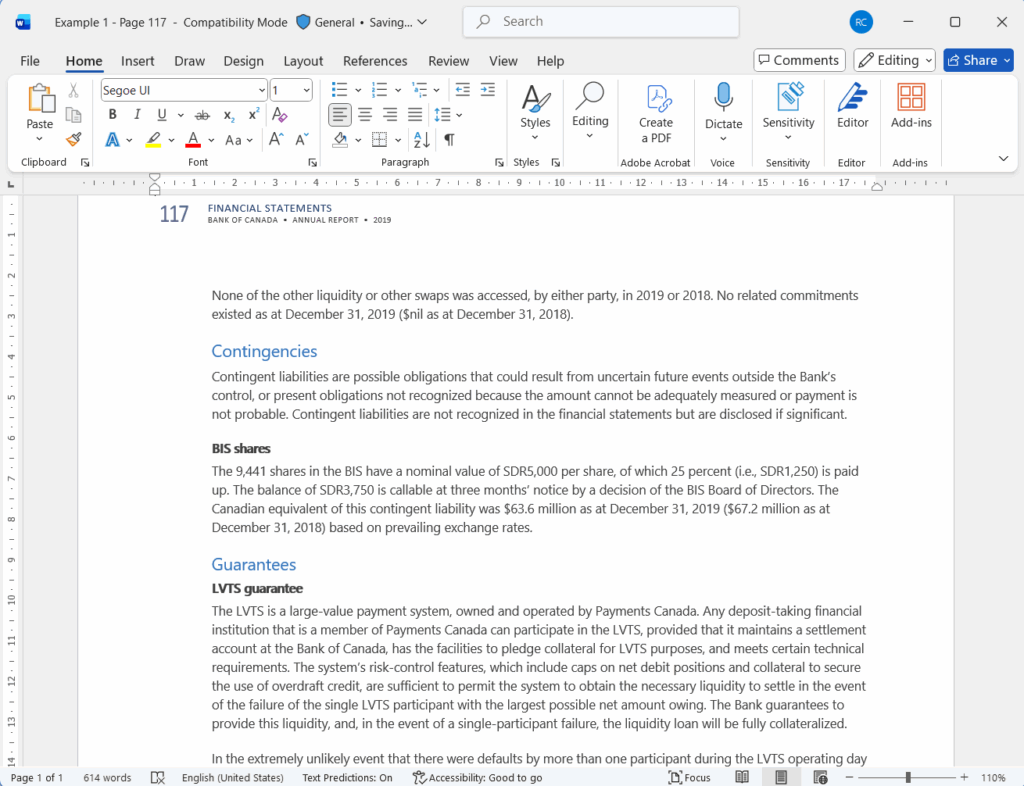
Able2Extract Professional 21 ensures that the professional documents you convert are polished, error free, and formatted correctly the first time around.
Accurate table recognition
Another significant update is the ability to detect tables. The upgraded conversion engine in the new Able2Extract accurately detects table structures in your PDFs and preserves the columns, rows, and merged cells when converting it over to Word.

You no longer have to struggle with failed table conversions and manually rebuild, fill and reformat the entire table. The PDF table data is transferred cleanly, so you can work with it in Microsoft Word directly and with ease.
Improved column layout detection
Another document structure-related improvement was Able2Extract’s ability to intelligently detect multi-column layouts in documents. Think reports, newsletters, journals, and financial summaries. You can now preserve their layout with greater accuracy.
These documents often lose structure during the conversion, causing issues such as a broken reading order, misaligned content, and flattened layouts. You can now preserve their layout with greater accuracy.

The converted Word output with Able2Extract Professional 21 maintains the proper column flow, consistent spacing, and accurate reading order. You no longer need to spend time manually reconstructing columns just to restore readability and flow.
Generate easily editable documents
All the features above equate to one benefit: you spend less time fixing formatting and more time getting work done. The tweaks in the PDF to Word conversion engine are aimed at producing easily editable Word documents.
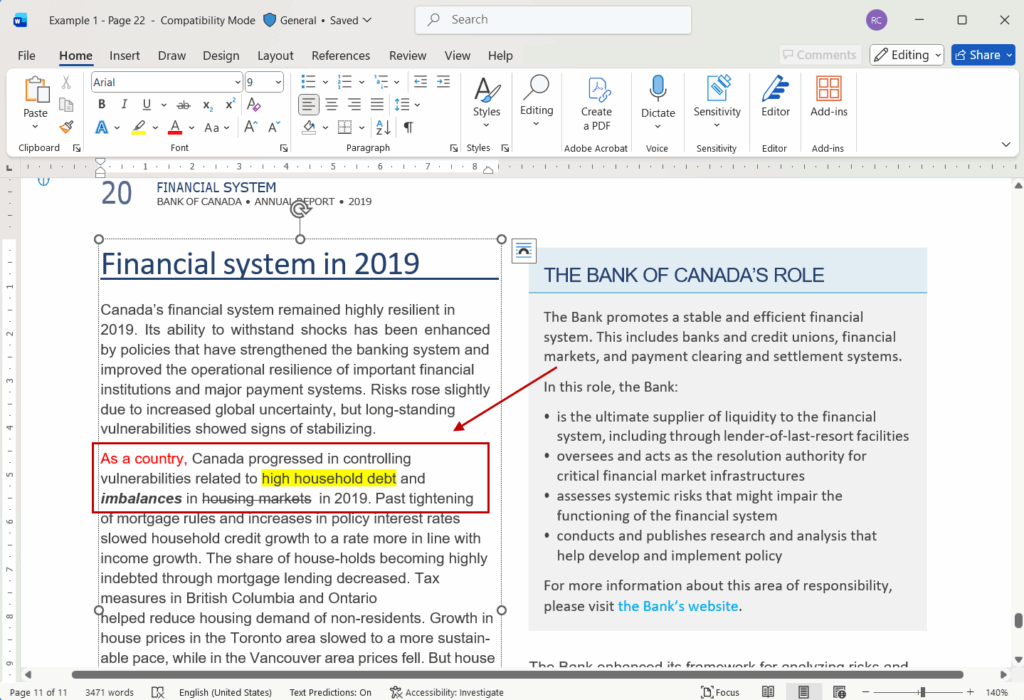
With better detection for different formatting issues, Able2Extract Professional 21 can better detect, identify, and more effectively transfer your PDF content into Microsoft Word.
From smarter paragraph recognition to accurate table and column detection, Able2Extract Professional 21 makes PDF to Word conversions cleaner, more structured, giving you editable documents you can use right away.
Refreshed user interface
Note that Able2Extract Professional 21 isn’t just smarter. It looks and feels better, too. We’ve introduced a refreshed user interface, making this version a visual upgrade that supports productivity without getting in the way.
Updated toolbar icons and modern color scheme
While the main layout and order of the toolbar you know and love hasn’t changed, the overall look and feel of it has.

The UI features sleek and updated icons and a cleaner color palette. Able2Extract Professional 21 is easier on the eyes with an all-blue colour scheme, eliminating distracting and harsh colours. The result? An interface that makes it easier to focus on the PDF task at hand.
Refined UI font for improved readability
In addition to a new look and feel, Able2Extract also provides a better user experience. We’ve added a new and more legible font throughout the user interface.

The switch in font enhances the overall readability of buttons and settings when locating or navigating through dialogs and conversion options. The new font reduces eye strain, making long editing sessions with Able2Exract more comfortable.
Able2Extract Professional 21: Get more precision with your PDFs
Able2Extract Professional 21 delivers better, more accurate results. It provides you with improvements where you need them the most.
From Excel data accuracy and Word document usability to a cleaner and more intuitive user experience that keeps you focused, this latest version has it all.
If you’re looking for a faster, smarter way to generate accurate PDF conversions, check out the latest release with a free 7-day trial (no credit card required)!