XPS to Word Conversion
The XPS Document format, developed by Microsoft, is designed to provide users with an alternative format for document workflows and information management. However, the XPS document format is limited. The XPS is a difficult format to edit because it is primarily a locked down presentation page format.
In contrast, Microsoft Word documents can be spontaneously created and edited. The format allows you to generate, modify and resave business reports, articles, or research papers easily. Word documents give you the most editing flexibility for your working needs. So how do you access the data trapped in the XPS format and interact with it in the same free manner? Simply convert it!
Unsure of what conversion applications you need? Searching online for solutions specific to your needs? Search no more, Able2Extract Professional is exactly what you need! It will allow you to quickly and easily extract the content from XPS into Word and more.

How to Convert XPS to Word with Able2Extract
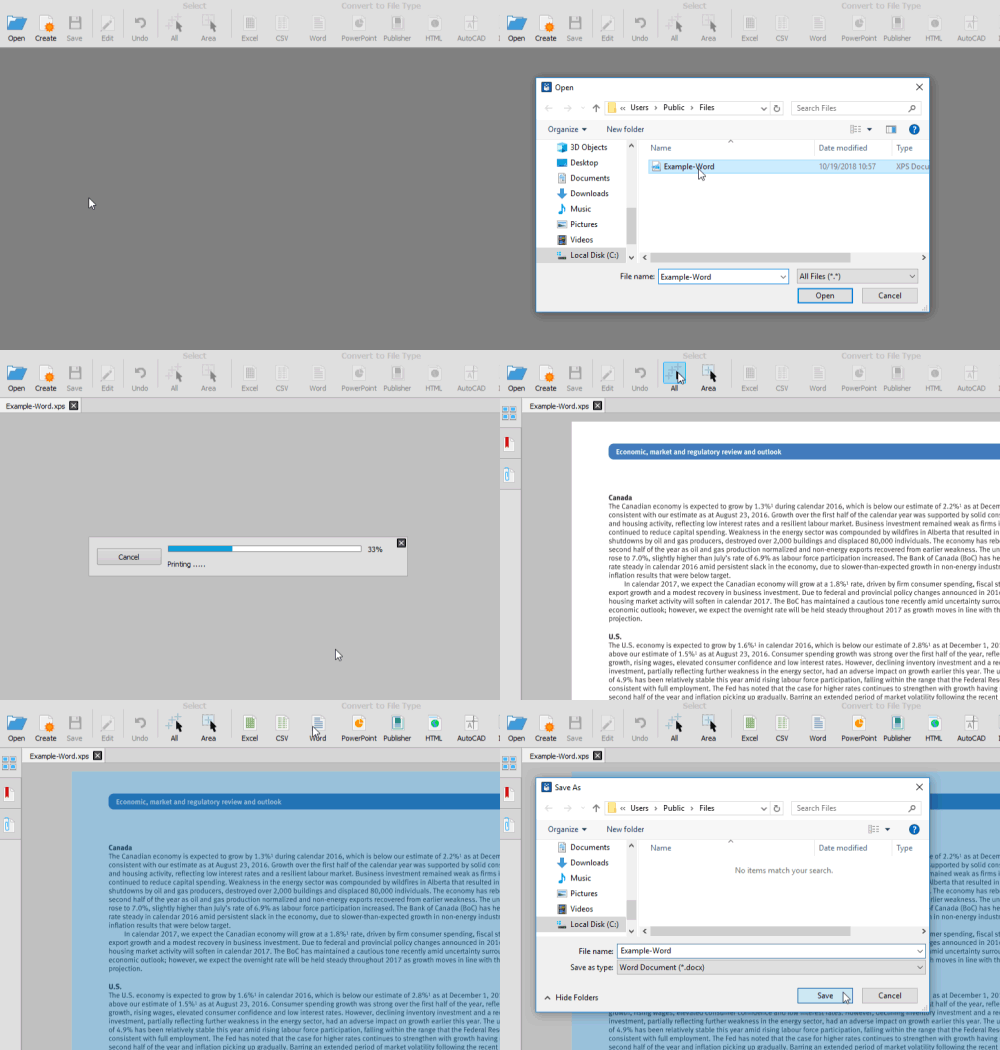
Using Able2Extract, you can accurately convert XPS to Word in seconds:
- Open your XPS file within Able2Extract.
- Select what to convert using the selection options in the right-side panel
- Click on the Word icon.
- Choose a location and click on the Save button.
How to Convert XPS to Other File Formats
Learn how to convert XPS to more file formats: